Friday, February 26, 2010

Some views in 'thirds'...


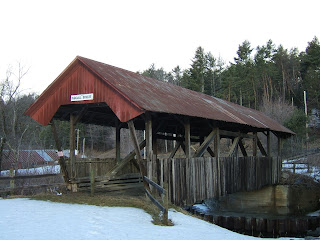
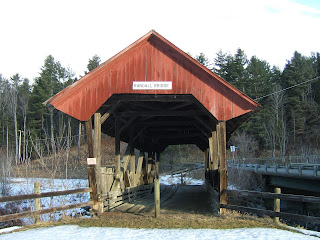
I am really enjoying trying out this concept! Above you can see one of our classic covered bridges. The opening shot is straight on and centered, and I think it captures NONE of the true essence of a covered bridge! By changing my perspective a tad and moving the opening of the bridge off to one of the 'thirds' lines I hope I captured more of why we love these wonderful pieces of the past!

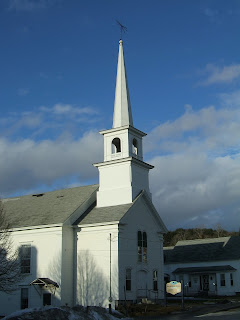
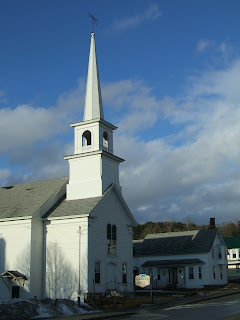
Below I celebrated a brief bit of this morning's sun to take another picture of a New England standard, the crisp white church. In the first photo the steeple is centered in the middle, which does draw the eye in for a solid focus, but in the second photo I tried to move the steeple off a bit to the left allowing the camera to capture a bit 'more' of the scene giving it a more complete feel (to my eye anyway).

Hope you enjoy today, and avoid the wind!
Murph

The frozen waterfall/stream awakens...


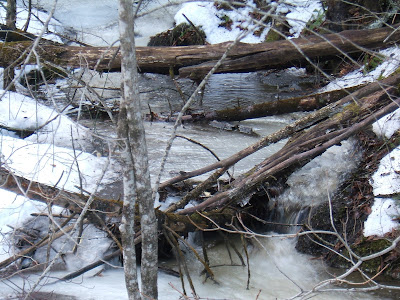
From my 'composition' blog I showed you my attempt at a frozen stream/waterfall. Well guess who woke up overnight? I know I didn't clear the frame up with my pruning shears for that nice crisp shot, but I wanted you to be able to see what I was attempting to capture!

Below I used my zoom to try to remove some of the white noise and provide more focus on the moving water! Is it still to early to look forward to spring?

Wednesday, February 24, 2010

Fun with basic composition...

I found this cool site for some basic photography techniques. What do you think they have as the first topic? Composition!

From the website I was gently reminded that, "Good pictures are seldom created by chance". One of the suggestions was that we need to learn to see (the potential picture) as our camera sees. As I was reading the paragraph about this concept, it was if a light bulb went off in my head. Have you ever taken a picture thinking to yourself "this is going to be the best picture ever" only to review it on your monitor or in you package of pictures and found it was full of things you did not want to capture? The author suggests that this is because we have been practicing selective vision. Our eye and our mind blocks out the 'white noise' in the photo allowing us to only take in the beauty of the scene. Our camera, and its amazing sensors, take the 'whole' image in. Let me show you an example:
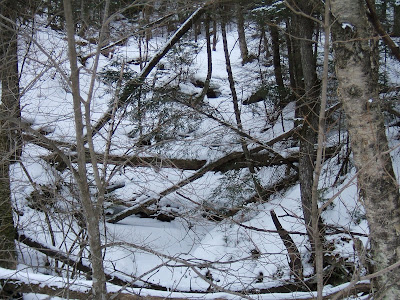

This mess of a photo I took last week while out snapping photos for our three different lighting scenes. Inside of all the tree branches and debris is the snow covered steps and body of a small frozen waterfall. My eye could see this winter beauty, but my camera...not so much! I'm not sure without a set of pruning shears or a small chainsaw would my camera be able to see the same image my mind's eye was capturing.

How are you going to develop these skills you may ask? The author suggests, "You look, you study, you practice". It will take time to learn to see the picture the way our camera does. One thing the author suggested was take the time to look all around your viewfinder or monitor screen. This practice will help you train your eye to take all of the picture in, not just the tiny part your eye happens to be focused on at the moment.

I don't know about you, but I'm going to go out and take some pictures...

Murph =)
Sunday, February 21, 2010

Three different lighting sessions...


This is my series of different light related pictures. The day was completely overcast, so the light was naturally diffused from the first picture to the last. I went without a shutter for all three pictures, relying on the surrounding area to offer me a rest for the camera. This is early morning dawn...f 2.8, shutter speed 70, ISO 100.


Midday brought me this picture...the natural colors come forth better in the full light. f 4.5, shutter speed 400, ISO 80. Thank god for the auto function...


The falling dusk shot can be the hardest to capture of them all. My viewfinder does not show you the best picture in low light conditions, so I rely on the "feel". f 2.8, shutter speed 4, ISO 200.

Please enjoy! Murph

Thursday, February 18, 2010

Monochrome of gold and a complementary of blue/gold?


I LOVE Boston...I took this picture at the Prudential Center complex/Mall. I was looking to capture the monochrome feeling of pure gold...


I'm hoping this picture represents a complementary color photo. I was focused on the gold bulbs against the blue sky backdrop when I attempted this photo...

Thanks for looking! Murph

How about a photo edited to black and white?


Kevin et all,

Does the monochromatic theme still count if you use a program to edit to the picture? I think Jak stands out even more in black and white...

Murph
Posted by Picasa

Analogous and monochrome


This winter evening scene was shot from my back porch. I'm hoping this picture captures the concept of an analogous color photo. The evening light gives the snow a blueish hue while the descending sun granted me the soft fading purple tones. You are reminded to take the shot quickly as only a few minutes later the tones completely change...


This is one of my cats, Jak! He is my first attempt at a monochromatic color photo. I was thinking that grey being a variation of black would still have this qualify on the black and white spectrum of the color wheel...I was going to crop out the feet in the picture, but I'm still learning about composition so I'm showing it as it is...

=) Murph

Saturday, February 13, 2010

A different type of macro...


One thing that you may not have yet learned about me is I am a tattoo collector. I have worked with the same artist, Phuc Tran, for several years now. In 2009 he was the feature artist in Skin Art magazine (July) and one of my tattoos (the Buddha found in the collage) was picked as one of his art pieces for the article. I snapped some images using the macro function of my camera to arrage this collage of a small sampling of his artwork. Phuc Tran, Tsunami Tattoo, Portland, ME.
Posted by Picasa

Thursday, February 11, 2010

Macro Blog!

This project was quite fun! I haven't taken the time to snap so many pictures in one week in quite a while. I wanted to have fun with color, texture, and various subjects. I hope you enjoy!
Posted by Picasa

Monday, February 8, 2010

My family as a collage...


I couldn't wait to try the collage function...too fun!

Wednesday, February 3, 2010

Compare and contrast part two...


Remember how I said I would find out how to turn off that flash? After the flash is turned off and I take the time to capture the photo with just the light in the room (thank you auto function for balancing shutter speed and aperture) you can see the texture present in this painting! In the first photo it is really hard to tell this painting has very visible brush strokes and depth! Totally cool what these cameras can do....

Comparing and contrasting...

I enjoyed this first quick exercise in taking pictures from multiple angles/points of interest to compare and contrast the differences. The photos are of a painting I have in my home, and while "mood lighting" may enhance the viewing of the picture while standing in front of it, mood lighting+auto flash= flash burn on many of my pictures! But since this first week wasn't about my flash burning abilities, let's take a look huh? This first photo was taken from the side with the lighting left on and the auto flash kicking in (I'll find the damn off button soon! Oh wait, how about I just put down the flash? Now it's off...) but by moving to the side the flash burn is reduce to a minimum and the picture is captured! I love the colors that come out and demonstrate just how perfect this painting is for the color of my study...

Tuesday, February 2, 2010

What is it part two...

Since my first picture was a bit on the SMALL side, I've expanded it a bit and added a slightly larger clue as to what you are looking at...

:) Murph

Followers